

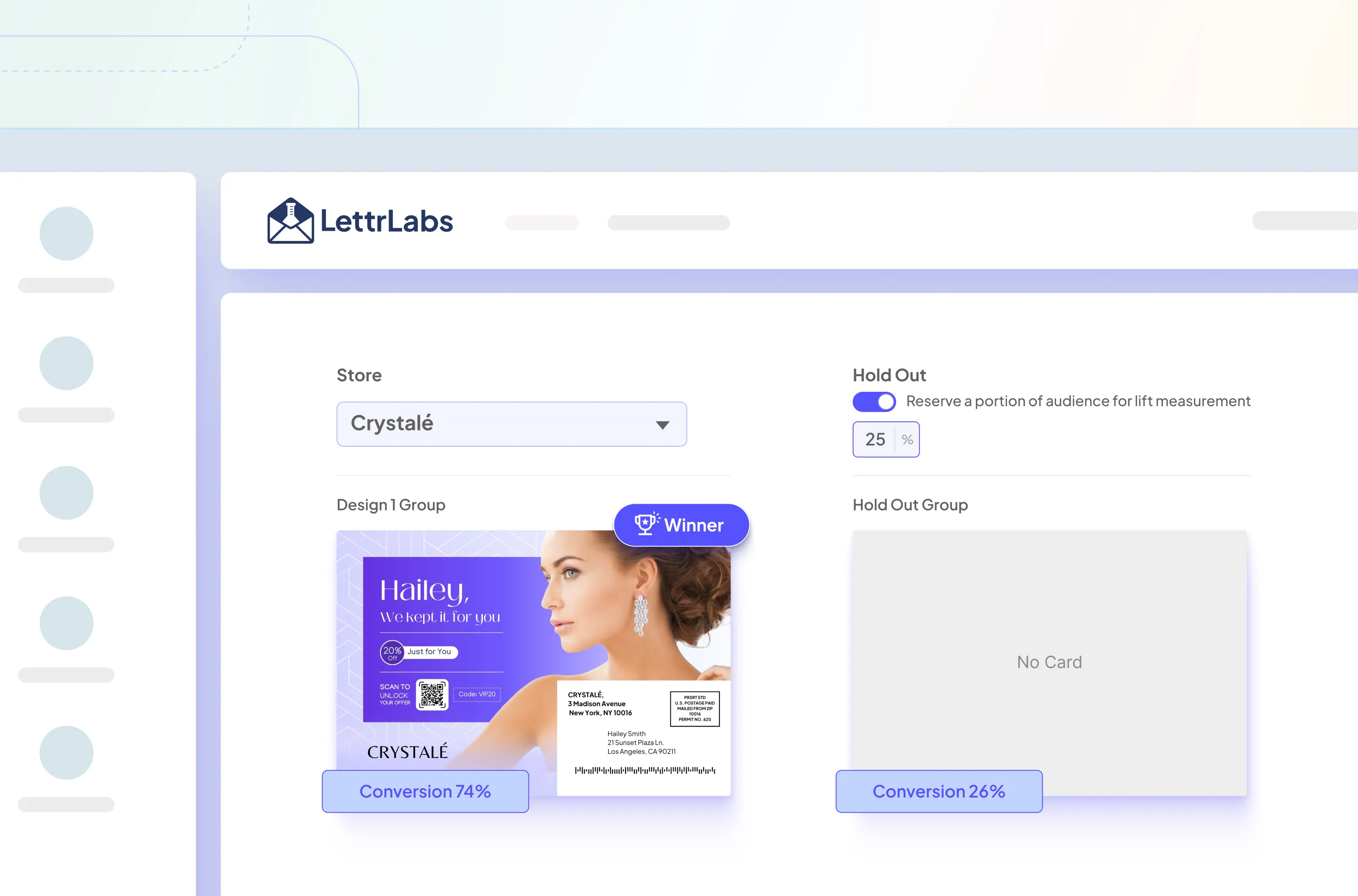
By the end of this walkthrough, you will have a cross-sell retargeting campaign live in LettrLabs with a built-in holdout for lift measurement.
🚀 Getting started
Log in to LettrLabs and go to Automations. Click New Automation in the top-right.
From the automation types, choose Shopify.
📌 First-time users: Connect your Shopify store to LettrLabs before creating your first automation, then return here to continue setup.
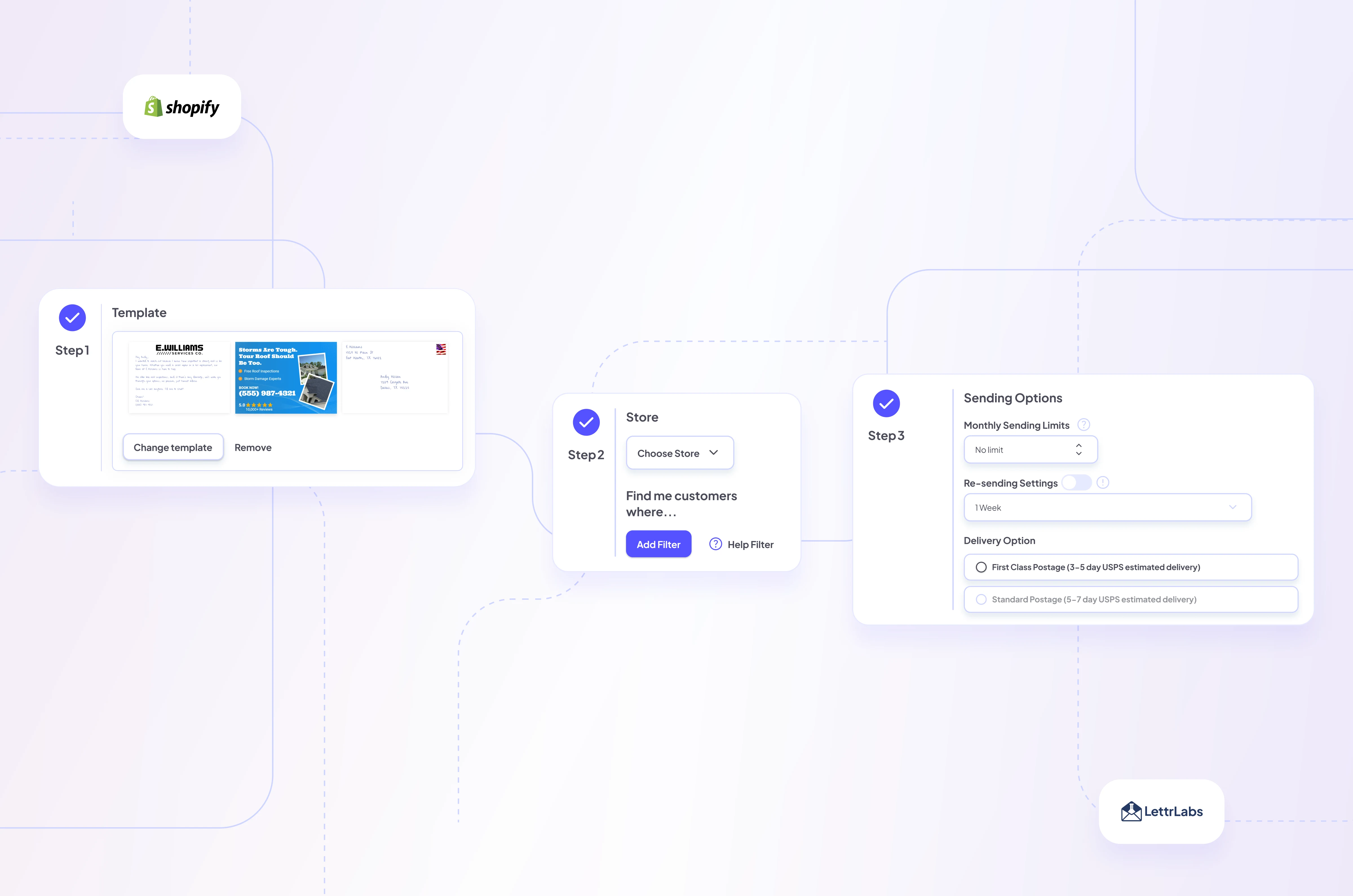
Step 1: Add your card template
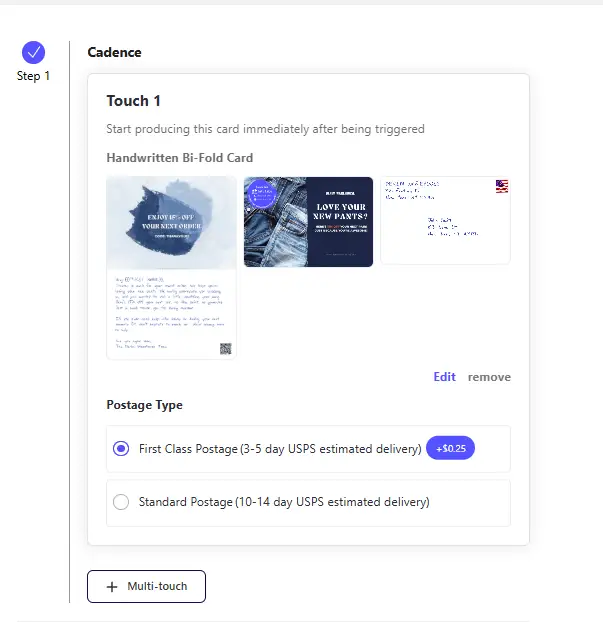
Pick the design you want to use for your retarget product. Start from a saved template or create a new one.
- Handwritten cards or postcards for a personal feel
- Printed postcards or letters for more space and detailed offers
Add your logo, brand colors, and a clear message. Example copy:
“Thanks again, {First Name}. Complete your set with Product B. Use code BUNDLE15 this week.”
Step 2: Select your store and set filters
First, choose the correct Shopify Store from the dropdown.
Click Change Filter and build your audience:
Include recent buyers of Product A
- Products Purchased (total unique, multiple orders): is equal to 1
- Add where (order details):
- Purchase Date: less than 7 days ago
- Products Purchased (name): [Your Product A]
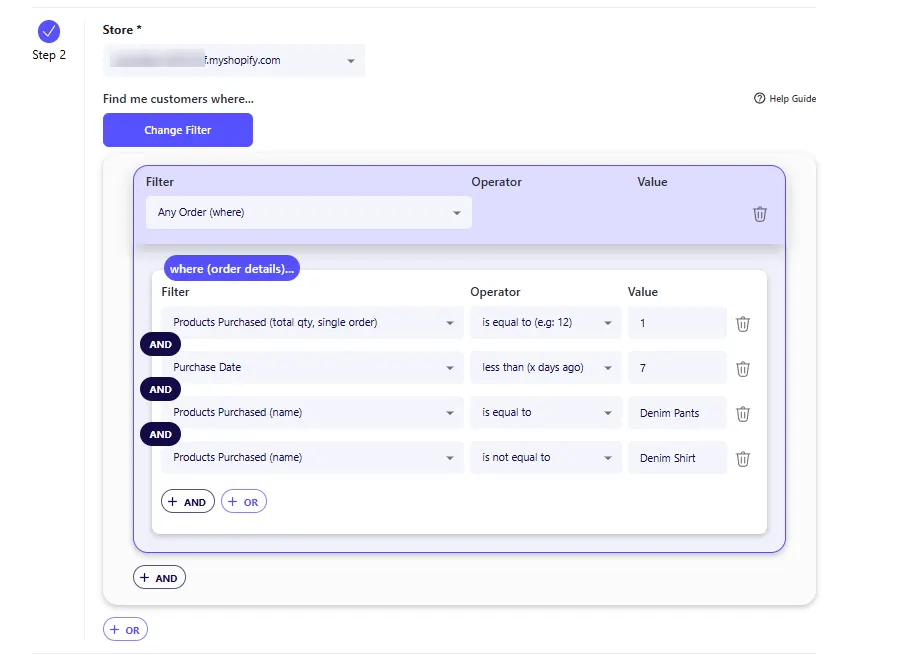
Exclude customers who already own Product B
- Add AND filter: Products Purchased (name): is not equal to [Your Product B]
Tip: If Product B has variants, include each variant name or target the collection.
Step 3: Add a holdout group

Toggle Holdout and choose a percentage. Start with 25%.
This group will not receive mail. You will compare Mailed vs Holdout later to measure lift.
Step 4: Set sending options

Set a monthly send cap to control budget. Preview the current audience size to make sure your cap and filters align.
- Start small while testing, for example 500 cards per month
- Increase to scale once you see ROI
LettrLabs will pause sends when the cap is reached and resume next month.
Step 5: Preview and save
Review the audience, exclusions, holdout setting, send cap, and artwork.
Scan the QR code and verify the promo code in Shopify checkout.
When everything looks right, click Save to activate the automation.
Why this works
- Timely: You reach customers soon after they engaged.
- Relevant: You cross-sell a complementary product.
- Measurable: The holdout proves whether mail lifted conversions.
How to measure lift
After the campaign runs, compare Mailed vs Holdout.
Formulas
- Mailed conversion rate = Mailed orders ÷ Mailed recipients
- Holdout conversion rate = Holdout orders ÷ Holdout recipients
- Incremental lift = Mailed conversion rate − Holdout conversion rate
- Incremental orders = Incremental lift × Mailed recipients
- Incremental revenue = Incremental orders × Average order value (AOV)
- Incremental ROAS = Incremental revenue ÷ Campaign cost
Example (25% holdout, iROAS ≈ 5.01×):
- Mailed recipients: 7,500; orders: 787 → 10.5%
- Holdout recipients: 2,500; orders: 130 → 5.2%
- Incremental lift: +5.3 pts
- Incremental orders: (0.105 − 0.052) × 7,500 = 397
- Incremental revenue: 397 × $90 = $35,730
- Campaign cost: $7,125
- Incremental ROAS: $35,730 ÷ $7,125 ≈ 5.01×
Use the LettrLabs attribution dashboard and matchback reporting to compare groups and calculate lift.
Best practices
- Audience freshness: Keep the look-back window tight (7–14 days) so intent is high.
- Offer strategy: Use a simple offer for Product B, or no offer if margin is tight.
- Creative clarity: Put the product image, benefit, and CTA above the fold.
- Tracking: Use unique promo codes and a QR link with UTM parameters.
- Holdout size: Use at least 25% (platform minimum). Consider increasing above 25% for larger audiences to improve statistical confidence.
- Cadence: Do not mail to the same person too often. Align with your email/SMS rules.
QA checklist before launch
- Filters return the expected customers for Product A.
- Exclusion for prior Product B buyers is applied.
- Holdout is toggled on and set to the intended percentage.
- QR code scans to the correct landing page.
- Promo code works in Shopify checkout.
- Counts, budget, and artwork pass final review.
Troubleshooting
- Audience looks too small: Widen the purchase window or include more variants of Product A.
- Exclusions not working: Confirm Product B naming matches Shopify exactly.
- Low scan or redemption rates: Shorten the copy, tighten the CTA, and ensure the QR lands on a fast page focused on Product B.
- No measurable lift: Increase your audience size, refine targeting, or raise the holdout percentage for clearer signal.
Next steps
Compare plans on the Pricing page, or book a quick walkthrough to connect Shopify, launch your first holdout-tested retargeting campaign, and review lift measurement.





.png)


